Swarm
本指南详细介绍如何使用 docker stack deploy,将 Traefik Proxy 作为 Swarm 服务安装和配置。指南采用与独立 Docker 教程相同的结构,涵盖:
- 启用 Swarm 提供者
- 暴露 web(HTTP :80)和 websecure(HTTPS :443)入口点
- 将所有 HTTP 流量重定向到 HTTPS
- 使用 basic-auth 保护 Traefik 仪表盘
- 使用适用于
*.swarm.localhost的自签名证书终止 TLS - 部署 whoami 演示服务
- 启用访问日志和 Prometheus 指标
前提条件
- 已初始化 Swarm 模式的 Docker Engine(
docker swarm init) - Docker Compose
opensslhtpasswd
创建自签名证书
Traefik 需要证书才能在本地提供 HTTPS。在生产环境中应使用可信 CA 签发的证书,但对于多节点开发 Swarm,快速生成的自签名证书就足够了:
mkdir -p certs
openssl req -x509 -nodes -days 365 -newkey rsa:2048 \
  -keyout certs/local.key -out certs/local.crt \
  -subj "/CN=*.swarm.localhost"
创建 Traefik 仪表盘凭证
生成一组带哈希的用户名与密码凭证,供 Traefik 中间件验证:
htpasswd -nb admin "P@ssw0rd" | sed -e 's/\$/\$\$/g'复制完整输出(例如 admin:$$apr1$$…),稍后将其粘贴到中间件标签中。
创建 docker-compose-swarm.yaml
说明
Swarm 使用 docker stack deploy。Compose 文件可以采用任意名称;这里使用 docker‑compose‑swarm.yaml。
首先,创建名为 dynamic 的文件夹,并添加 tls.yaml 用于动态 TLS 配置:
# dynamic/tls.yaml
tls:
  certificates:
    - certFile: /certs/local.crt
      keyFile:  /certs/local.key
在同一目录中,创建 docker‑compose‑swarm.yaml:
services:
  traefik:
    image: traefik:v3.7

    networks:
    # Connect to the 'traefik_proxy' overlay network for inter-container communication across nodes
      - traefik_proxy

    ports:
        # Expose Traefik's entry points to the Swarm
        # Swarm requires the long syntax for ports.
      - target: 80 # Container port (Traefik web entry point)
        published: 80 # Host port exposed on the nodes
        protocol: tcp
        # 'host' mode binds directly to the node's IP where the task runs.
        # 'ingress' mode uses Swarm's Routing Mesh (load balances across nodes).
        # Choose based on your load balancing strategy. 'host' is often simpler if using an external LB.
        mode: host
      - target: 443 # Container port ( Traefik websecure entry point)
        published: 443 # Host port
        protocol: tcp
        mode: host

    volumes:
      # Mount the Docker socket for the Swarm provider
      # This MUST be run from a manager node to access the Swarm API via the socket.
      - /var/run/docker.sock:/var/run/docker.sock:ro   # Swarm API socket
      - ./certs:/certs:ro
      - ./dynamic:/dynamic:ro

    # Traefik Static configuration via command-line arguments
    command:
      # HTTP EntryPoint
      - "--entrypoints.web.address=:80"

      # Configure HTTP to HTTPS Redirection
      - "--entrypoints.web.http.redirections.entrypoint.to=websecure"
      - "--entrypoints.web.http.redirections.entrypoint.scheme=https"
      - "--entrypoints.web.http.redirections.entrypoint.permanent=true"

      # HTTPS EntryPoint
      - "--entrypoints.websecure.address=:443"
      - "--entrypoints.websecure.http.tls=true"

      # Attach dynamic TLS file
      - "--providers.file.filename=/dynamic/tls.yaml"

      # Providers

      # Enable the Docker Swarm provider (instead of Docker provider)
      - "--providers.swarm.endpoint=unix:///var/run/docker.sock"

      # Watch for Swarm service changes (requires socket access)
      - "--providers.swarm.watch=true"

      # Recommended: Don't expose services by default; require explicit labels
      - "--providers.swarm.exposedbydefault=false"

      # Specify the default network for Traefik to connect to services
      - "--providers.swarm.network=traefik_traefik_proxy"

      # API & Dashboard
      - "--api.dashboard=true" # Enable the dashboard
      - "--api.insecure=false" # Explicitly disable insecure API mod

      # Observability
      - "--log.level=INFO" # Set the Log Level e.g INFO, DEBUG
      - "--accesslog=true" # Enable Access Logs
      - "--metrics.prometheus=true"  # Enable Prometheus

    deploy:
      mode: replicated
      replicas: 1
      placement:

      # Placement constraints restrict where Traefik tasks can run.
      # Running on manager nodes is common for accessing the Swarm API via the socket.
        constraints:
          - node.role == manager

      # Traefik Dynamic configuration via labels
      # In Swarm, labels on the service definition configure Traefik routing for that service.
      labels:
        - "traefik.enable=true"

        # Dashboard router
        - "traefik.http.routers.dashboard.rule=Host(`dashboard.swarm.localhost`)"
        - "traefik.http.routers.dashboard.entrypoints=websecure"
        - "traefik.http.routers.dashboard.service=api@internal"
        - "traefik.http.routers.dashboard.tls=true"

        # Basic‑auth middleware
        - "traefik.http.middlewares.dashboard-auth.basicauth.users=<PASTE_HASH_HERE>"
        - "traefik.http.routers.dashboard.middlewares=dashboard-auth@swarm"

        # Service hint
        - "traefik.http.services.traefik.loadbalancer.server.port=8080"

  # Deploy the Whoami application
  whoami:
    image: traefik/whoami
    networks:
      - traefik_proxy
    deploy:
      labels:
        # Enable Service discovery for Traefik
        - "traefik.enable=true"
        # Define the WHoami router rule
        - "traefik.http.routers.whoami.rule=Host(`whoami.swarm.localhost`)"
        # Expose Whoami on the HTTPS entrypoint
        - "traefik.http.routers.whoami.entrypoints=websecure"
        # Enable TLS
        - "traefik.http.routers.whoami.tls=true"
        # Expose the whoami port number to Traefik
        - traefik.http.services.whoami.loadbalancer.server.port=80

# Define the overlay network for Swarm
networks:
  traefik_proxy:
    driver: overlay
    attachable: true
提示
- 将
<PASTE_HASH_HERE>替换为上一步得到的已转义哈希。 - 密码哈希直接存储在服务标签中。本地开发可以这样做,但任何能够访问 Docker API 的人都可以通过
docker service inspect查看它。生产环境应使用更安全的方式存储秘密信息。
启动应用栈
创建一次覆盖网络(如果尚不存在),然后部署:
docker network create --driver overlay --attachable traefik_proxy || true
docker stack deploy -c docker-compose-swarm.yaml traefik
Swarm 将服务调度到管理节点,并绑定 80/443 端口。
访问仪表盘
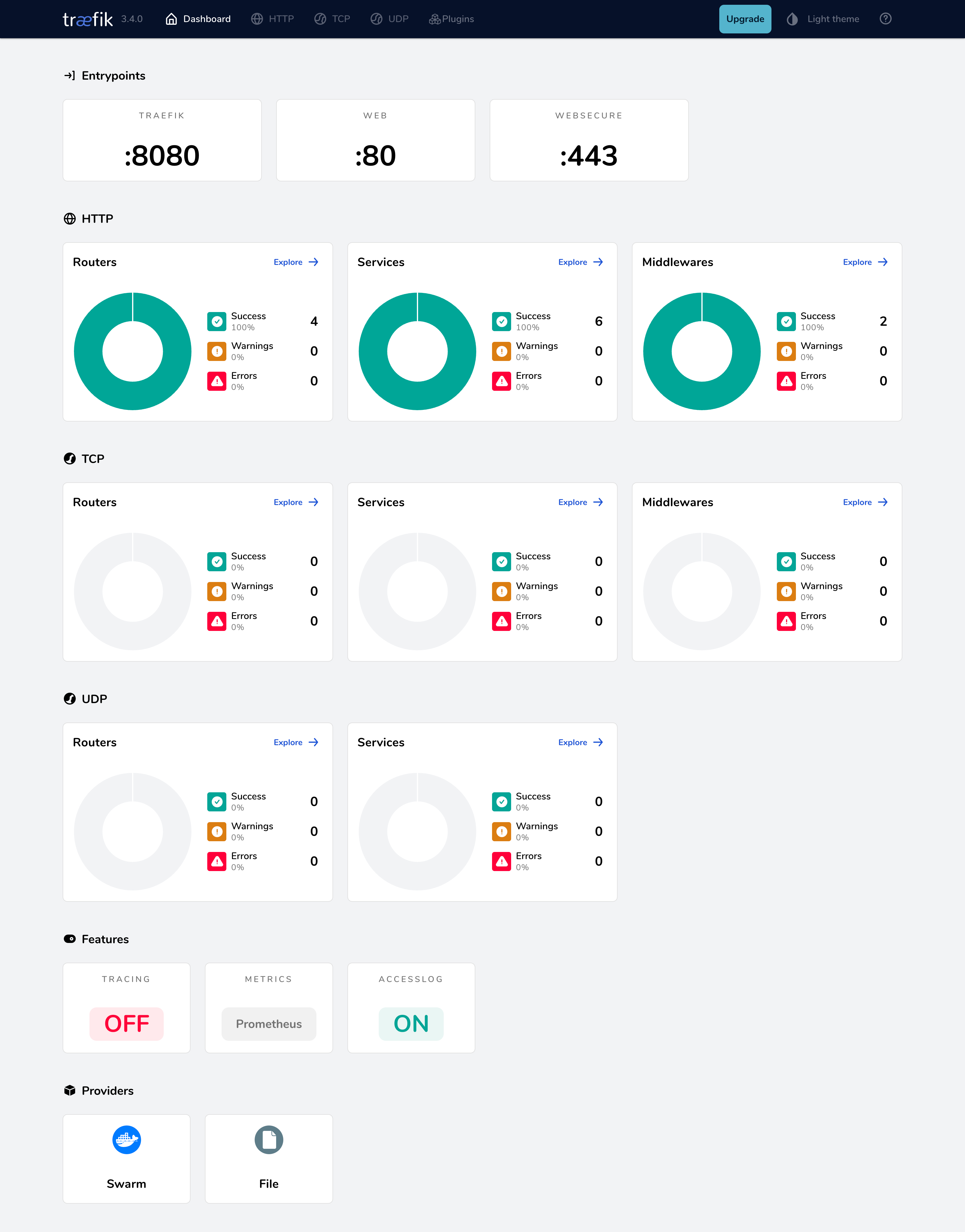
在浏览器中打开 https://dashboard.swarm.localhost/,仪表盘应提示输入您配置的 basic-auth 凭证。
测试 whoami 应用
您可以使用 curl 测试应用:
curl -k https://whoami.swarm.localhost/Hostname: whoami-76c9859cfc-k7jzs
IP: 127.0.0.1
IP: ::1
IP: 10.42.0.59
IP: fe80::50d7:a2ff:fed5:2530
RemoteAddr: 10.42.0.60:54148
GET / HTTP/1.1
Host: whoami.swarm.localhost
User-Agent: curl/8.7.1
Accept: */*
Accept-Encoding: gzip
X-Forwarded-For: 10.42.0.1
X-Forwarded-Host: whoami.swarm.localhost
X-Forwarded-Port: 443
X-Forwarded-Proto: https
X-Forwarded-Server: traefik-644b7c67d9-f2tn9
X-Real-Ip: 10.42.0.1向 HTTP 入口点发出相同请求,会返回以下结果:
curl -k http://whoami.swarm.localhost

Moved Permanently
请求 HTTP 端点会重定向到 HTTPS,确认配置运行正常。
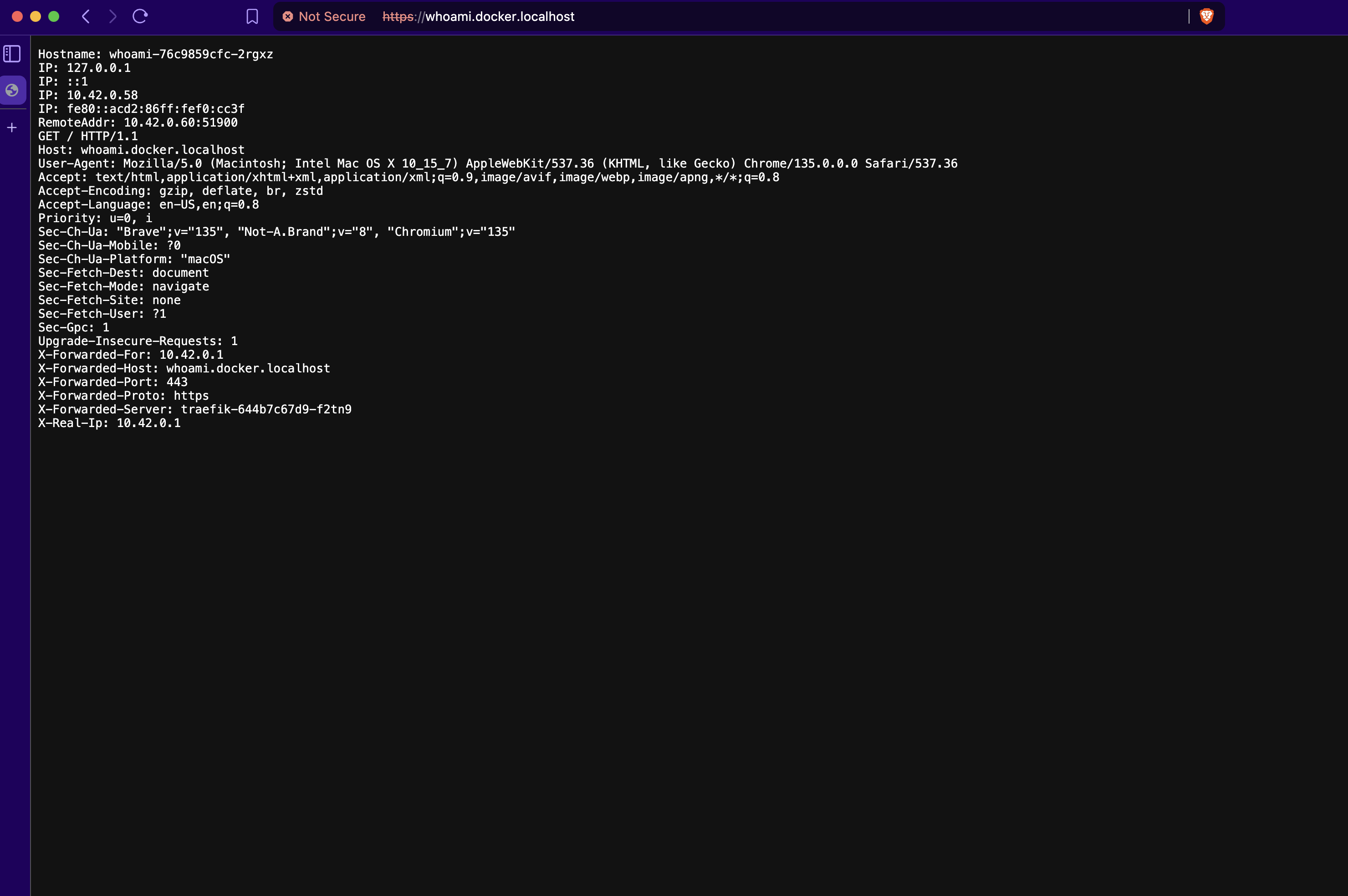
您也可以在浏览器中访问 https://whoami.swarm.localhost,查看服务输出的 JSON 数据:
其他关键配置领域
除了这一初始部署,Traefik 还提供丰富的配置能力。下面使用 Docker Compose 的 command 参数或 labels 给出简要介绍和最小示例。完整信息请参阅所链接的主文档。
TLS 证书管理(Let's Encrypt)
要让 websecure 入口点自动提供有效的 HTTPS 证书,请启用 Let's Encrypt(ACME)。
command:
  # ...
  - "[email protected]"
  - "--certificatesresolvers.le.acme.storage=/letsencrypt/acme.json"
  - "--certificatesresolvers.le.acme.httpchallenge.entrypoint=web"
  - "--entrypoints.websecure.http.tls.certresolver=le"
这会定义名为 le 的解析器,设置必需的电子邮件和存储路径(位于挂载的 /letsencrypt 卷内),并启用 HTTP 质询。质询和 DNS 提供商配置的详细信息,请参阅 HTTPS/TLS 文档和 Let's Encrypt 文档。
说明
- 确保
/letsencrypt路径位于共享卷或 NFS 上,使所有节点都能读取证书。 - 确保将
/letsencrypt卷挂载到traefik服务中(在docker-compose-swarm.yaml文件内)。
指标(Prometheus)
您可以暴露 Traefik 的内部指标,供 Prometheus 监控。此前的配置中已经启用了 Prometheus,但还可以进一步配置。
command 新增配置示例:
command:
  # If using a dedicated metrics entry point, define it:
  - "--entrypoints.metrics.address=:8082"

  - "--metrics.prometheus=true"

  # Optionally change the entry point metrics are exposed on (defaults to 'traefik')
  - "--metrics.prometheus.entrypoint=metrics"

  # Add labels to metrics for routers/services (can increase cardinality)
  - "--metrics.prometheus.addrouterslabels=true"
这会启用 /metrics 端点(通常通过内部 API 端口访问;未保护时默认常为 8080,也可通过专用入口点访问)。可用选项请参阅指标文档。
追踪(OTel)
您可以启用分布式追踪,跟踪请求经过 Traefik 的过程。
command 新增配置示例:
command:
  # ...
  - "--tracing.otel=true"
  - "--tracing.otel.grpcendpoint=otel-collector:4317"
说明
此选项需要一个正在运行且可由 Traefik 访问的 OTEL 收集器。请参阅追踪文档。
访问日志
您可以配置 Traefik 记录传入请求,用于调试和分析。
command 新增配置示例:
command:
  # ... other command arguments ...
  - "--accesslog=true" # Enable access logs to stdout

  # Optionally change format or output file (requires volume)
  - "--accesslog.format=json"
  - "--accesslog.filepath=/path/to/access.log"

  # Optionally filter logs
- "--accesslog.filters.statuscodes=400-599"结语
现在,您已在 Docker Swarm 上运行 Traefik,具备 HTTPS、安全仪表盘、自动 HTTP → HTTPS 重定向和基础可观测性。随着 Swarm 规模增长,可以通过 Let's Encrypt、其他中间件或多个 Traefik 副本扩展此应用栈。
在生产环境使用 Traefik OSS?
如果你在工作中使用 Traefik,可以考虑为 Traefik OSS 增加企业级 API 网关能力或商业支持。
为 Traefik OSS 增加 API 网关能力快捷且平滑,无需推倒重来,现有配置也会完整保留。请通过这个简短视频了解实际效果。